डेस्कटॉप
Windows या Linux पर Digital Design Studio में स्थानीय फ़ाइलों पर काम करें। Windows पर 2.1.2 से बाद के संस्करणों में अपडेट करते समय अब Windows को फिर से शुरू करने के लिए नहीं कहा जाता।
अपना डाउनलोड चुनेंVerilog & SystemVerilog RTL विकास।
Windows · Linux · Cloud

Digital Design Studio, RTL, Flow Navigator में ISA, ALcad और Agent को एक ही ऐप में रखता है।
Digital Design Studio में Verilog और SystemVerilog विकसित करें, समर्थित RTL सिमुलेशन चलाएँ और ISA, Evolve, Agent, ALcad व vFactory उपयोग करें। RTL और CAD में हर तरह के काम के लिए अलग इंटरफ़ेस है।
लिखें
मॉड्यूल पदानुक्रम और सिग्नल रूपरेखा के साथ .sv, .svh, .v और .vh स्रोत संपादित करें। आसपास का डिज़ाइन देखते हुए इंस्टेंस से उसके स्रोत तक जाएँ।

परियोजना की संरचना को ध्यान में रखते हुए मॉड्यूल इंस्टेंस और स्रोत में उनकी जगह पर जाएँ।
सक्रिय स्रोत फ़ाइल के साथ इनपुट, आउटपुट और आंतरिक सिग्नल देखें।

SystemC फ़ाइलों में HintsBox स्थानीय रूपरेखा और डिक्लेरेशन सुझाव दिखाता है, जिनमें sc_module क्लास भी शामिल हैं।
RTL सिमुलेशन
सिमुलेशन आपके PC पर चलता है और कोई Cloud जॉब शुरू नहीं करता।
जो टेस्टबेंच अपने आउटपुट में विफलता बताता है, वह Testbench reported a failure के रूप में दिखता है, भले ही सिम्युलेटर सामान्य रूप से बंद हो। पहले इसे पास के रूप में दिखाया जाता था।
विश्लेषण करें
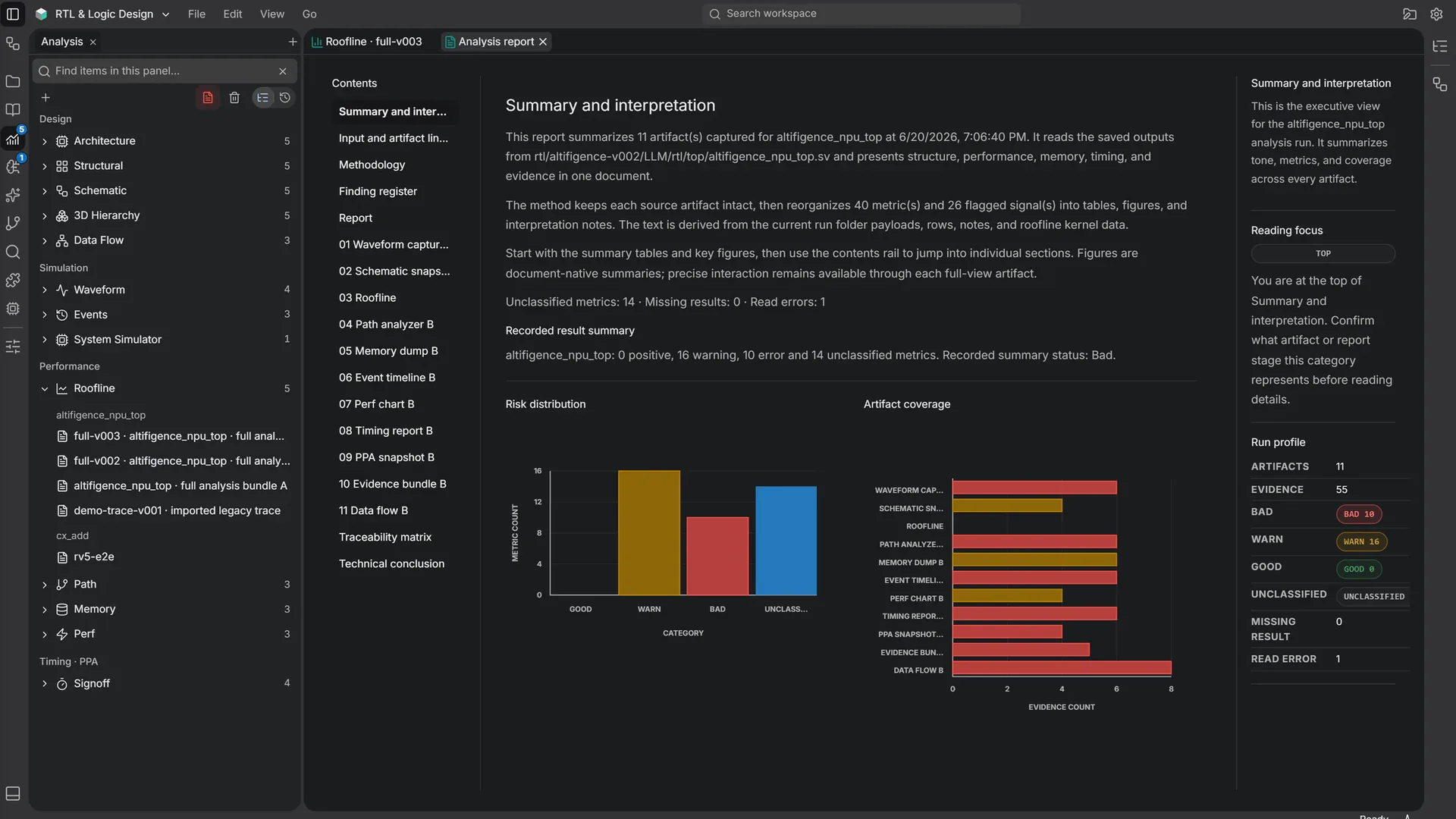
विश्लेषण, RTL और ISA कार्य के लिए परिणाम जाँचने का साझा क्षेत्र है। बाईं रेल से विश्लेषण खोलें, कोई सहेजा गया रन चुनें और फिर कोई आर्टिफ़ैक्ट चुनें। रन सूची परिणामों को मॉड्यूल के अनुसार समूहित करती है।

सहेजे गए रन और उनके वेवफ़ॉर्म, स्कीमैटिक, प्रदर्शन परिणाम तथा रिपोर्ट देखें।
Perf चुने गए रन की perf.json फ़ाइल पढ़ता है और सहेजे गए अवलोकनों को मापदंडों और चार्ट के रूप में दिखाता है।
प्रदर्शन विश्लेषण
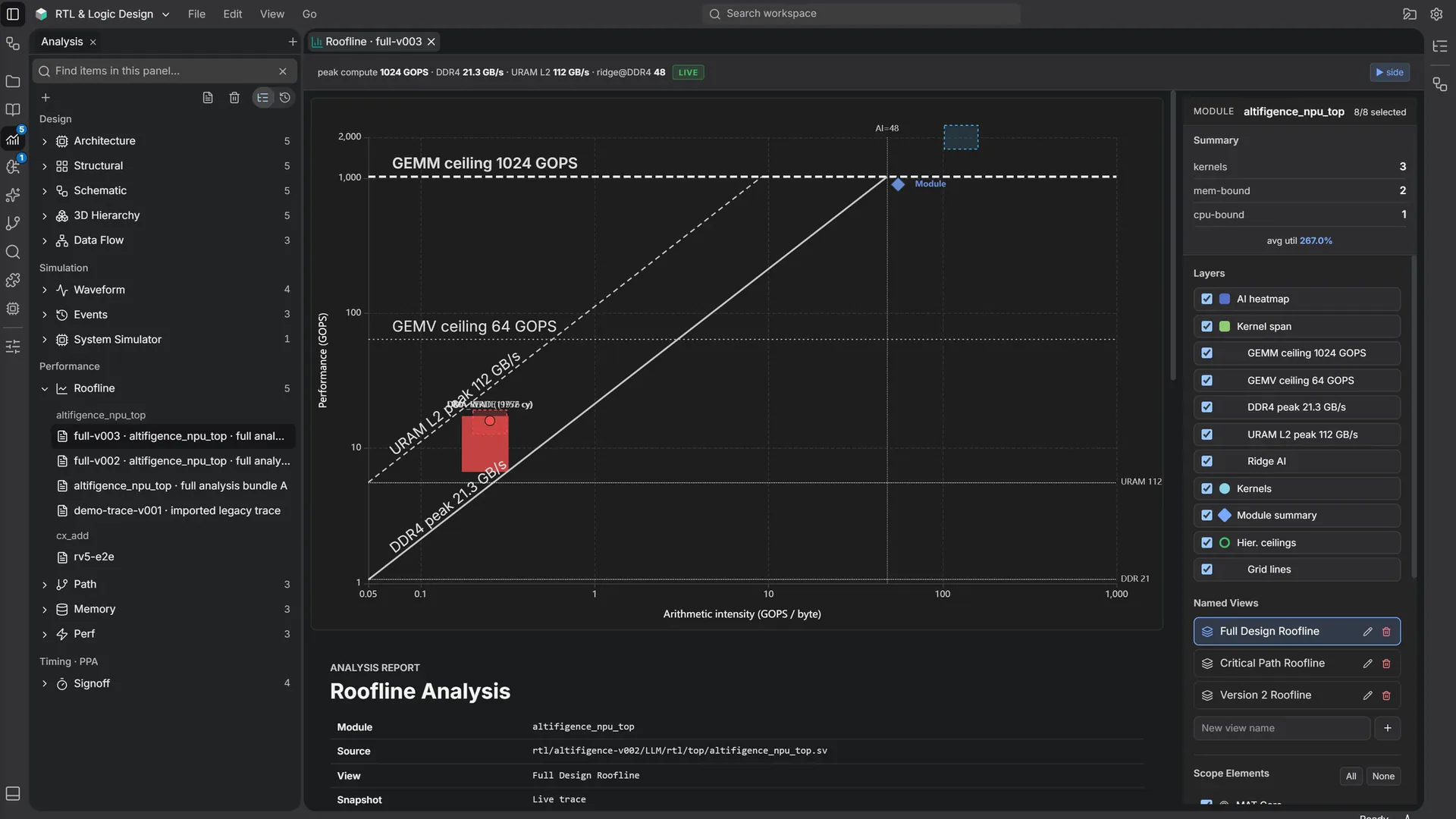
Roofline दृश्य में गणना थ्रूपुट और मेमोरी बैंडविड्थ की तुलना करें।


गणना क्षमता की अधिकतम सीमाओं और मेमोरी बैंडविड्थ के सापेक्ष मापे गए कर्नेल की स्थिति देखें।
रन के सारांश के साथ दिखने वाली सीमाएँ, कर्नेल और लेबल चुनें।
रिकॉर्ड किए गए परिणाम
यह उपलब्ध मापदंड और छूटे हुए अनुभाग दिखाता है। UI का निर्णय या अनुमान समीक्षा में मदद के लिए है; यह स्वतंत्र टाइमिंग क्लोज़र, निर्माण की मंज़ूरी या औपचारिक signoff नहीं है।


हर रिकॉर्ड इकाई के लिए एक ही पैमाने पर WNS, TNS और विफल पथों की तुलना करें। सहेजे गए टाइमिंग, PPA और साक्ष्य मान जैसे रिकॉर्ड हुए वैसे ही देखें, बिना गणना किए गए रिलीज़ निर्णय के।
पूछें
Agent, AI पैनल और अपनी अलग विंडो में उत्तर देता है। प्रोजेक्ट पढ़ने की सेटिंग ask होने पर वह फ़ाइलें पढ़ने से पहले मंज़ूरी माँगता है।

Agent और Own API key, दोनों में खोज शुरू में बंद रहती है।
ALcad
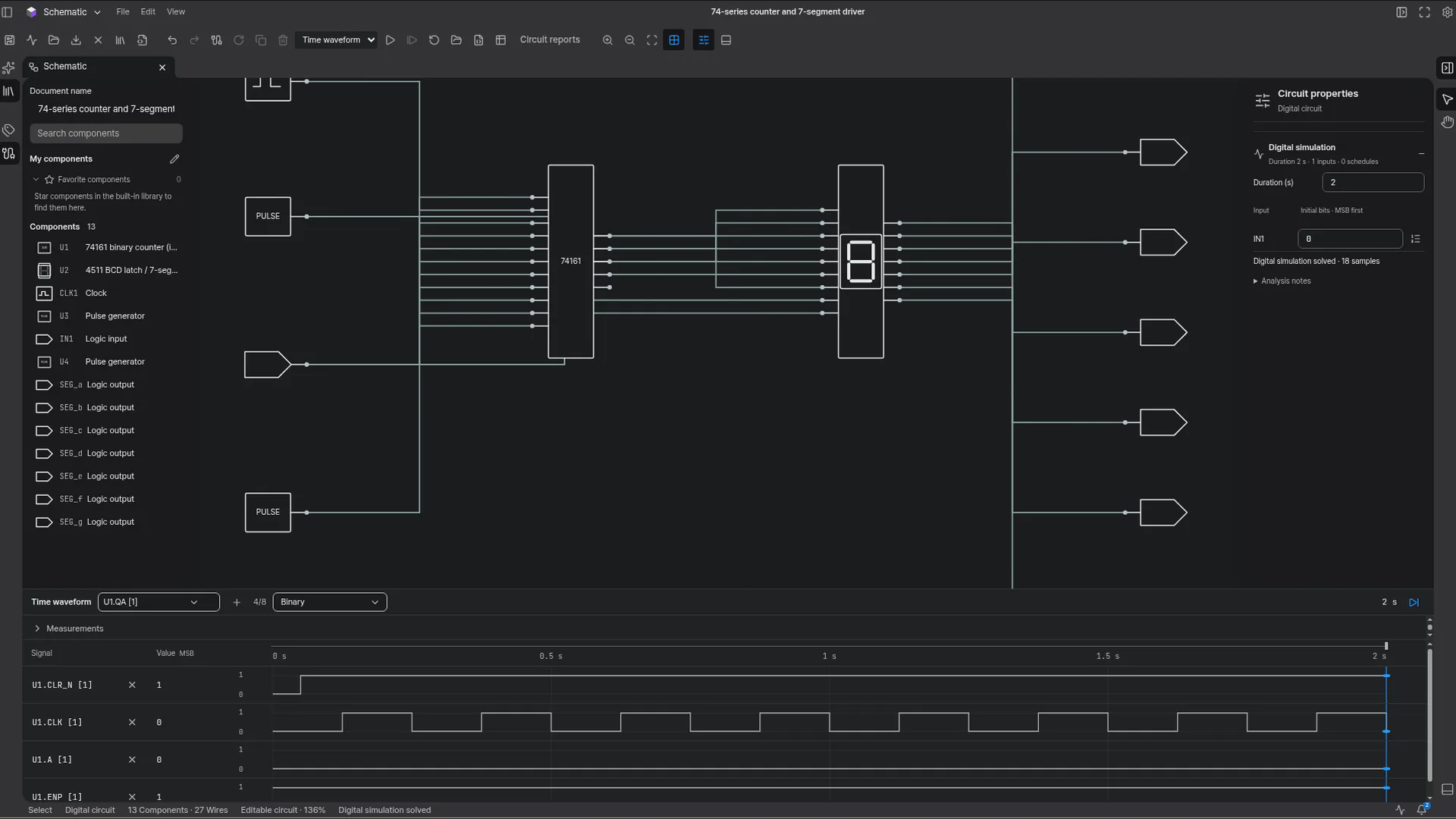
कार्यक्षेत्र मेनू से ALcad के Schematic, PCB Layout, 3D CAD, 3D Assembly और SI / PI Analysis चुनें। Wafer Process & Fab, जो पहले ALcad के अंतर्गत था, अब vFactory में है। ALcad का नाम और अलग UI बने रहते हैं।

स्कीमैटिक कैनवास पर घटक और उनके कनेक्शन देखें।
चुने गए घटक और उसके सर्किट पैरामीटर जाँचें।
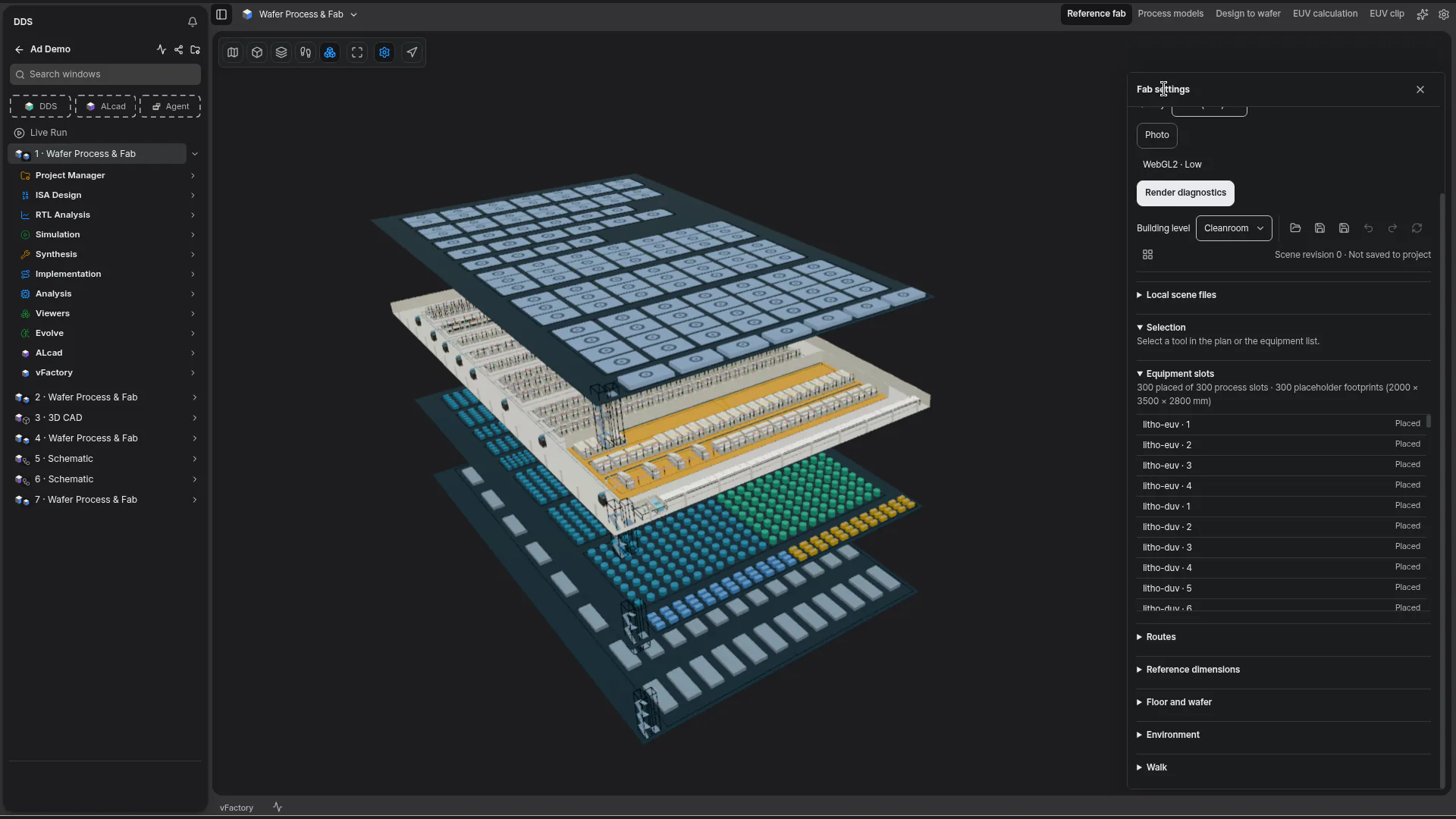
vFactory, DDS और ALcad के साथ वेफ़र प्रक्रियाओं और फ़ैब के लिए एक नया क्षेत्र है। vFactory देखें
देखें कि काम के अलग-अलग हिस्से कैसे जुड़ते हैं
पूरे रन नाम के लिए बहुत संकरे सहेजे गए परिणाम टैब एक छोटा हिस्सा रखते हैं जिससे वे अलग पहचाने जाएँ, जैसे …1 और …2, और टूलटिप पूरा नाम दिखाता है। एक ही शीर्षक वाले सहेजे गए परिणाम दिखाते हैं कि वे किस रन के हैं, खोज में भी।
चुना गया होस्ट जो रन सतह देता है, उसे देखने के लिए प्रोजेक्ट नेविगेशन में Live Run चुनें। प्रोजेक्ट विंडो सूची को फ़िल्टर करने के लिए Search windows इस्तेमाल करें।
Usage चुने गए संगठन का सक्रिय आवंटन, बची हुई मात्रा और रीसेट दिखाता है। साप्ताहिक QUOTA सात दिन के चक्र इस्तेमाल करता है।

जब टैब मेन्यू में Split Editor Right मिले, तो स्रोत और उसके स्कीमैटिक या रिपोर्ट को साथ-साथ रखने के लिए इसका इस्तेमाल करें। रिपोर्ट रन का संदर्भ बनाए रखती हैं और आर्टिफ़ैक्ट की सामग्री दिखाती हैं।

DDS में Flow Navigator खोलें और ज़रूरी फ़ंक्शन चुनें। RTL/SystemVerilog विकास और ISA डिज़ाइन को एक कार्यक्षेत्र में लाएँ; ISA Design फ़्लो, Flow Navigator से खुलते हैं। ISA, Digital Design Studio के शेल, सेटिंग, टैब और निचले पैनल का इस्तेमाल करता है।

स्कीमैटिक में मॉड्यूल, पोर्ट और नेट का पता लगाएँ। बड़े डिज़ाइन के हिस्से आपस में कैसे जुड़ते हैं, यह देखने के लिए 3D पदानुक्रम पर जाएँ।
शुरू से अंत तक का कार्यप्रवाह
संस्करण 2.1.2 डिज़ाइन और निर्माण को एक ऐप में जोड़ता है: DDS में ब्लॉक डिज़ाइन करें, ALcad में उसके सर्किट और बोर्ड तैयार करें और vFactory में उसे वेफ़र बनते देखें।
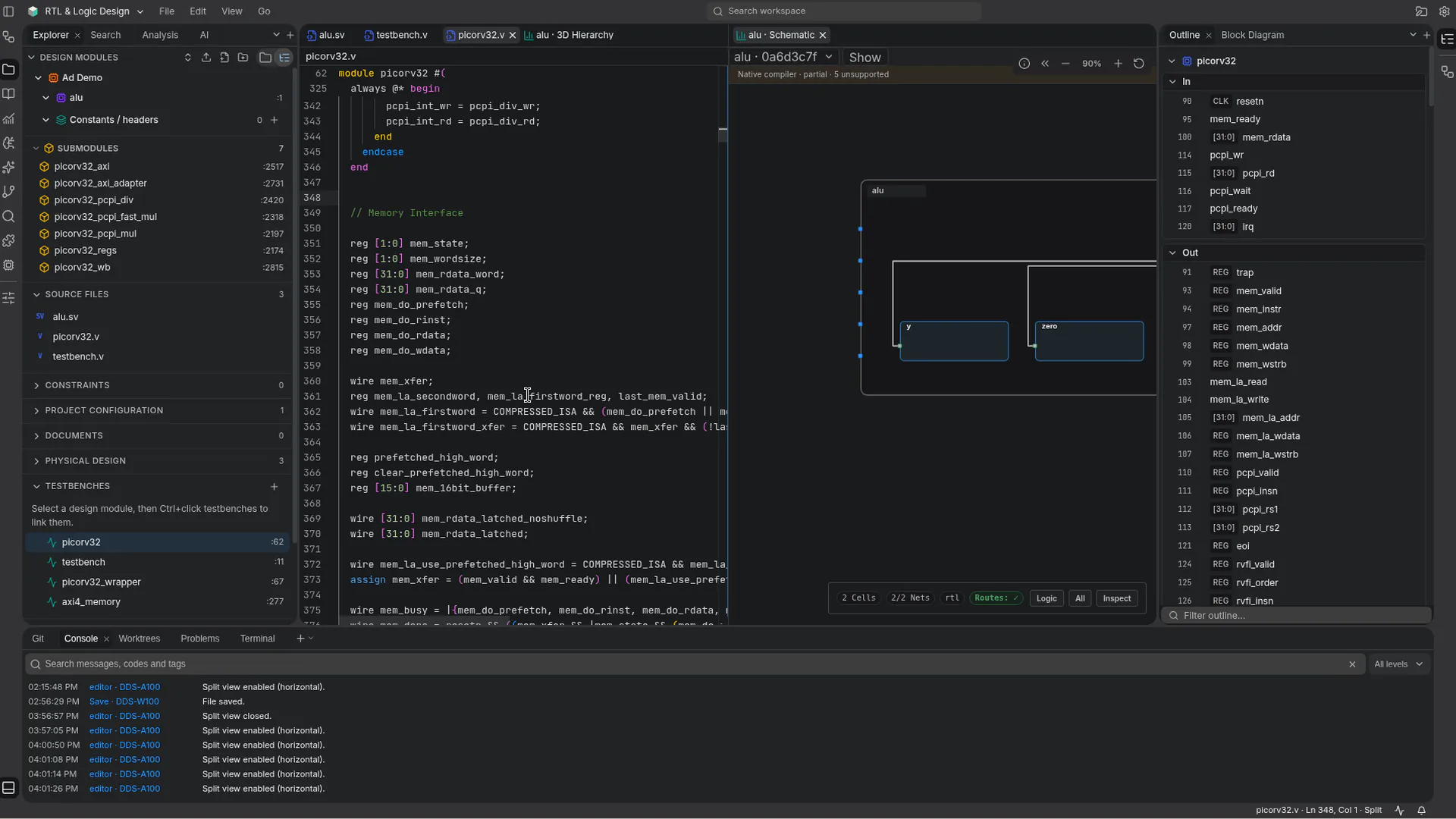
स्रोत, उसका स्कीमैटिक और उसके इनपुट, आउटपुट तथा आंतरिक सिग्नल साथ-साथ देखें।
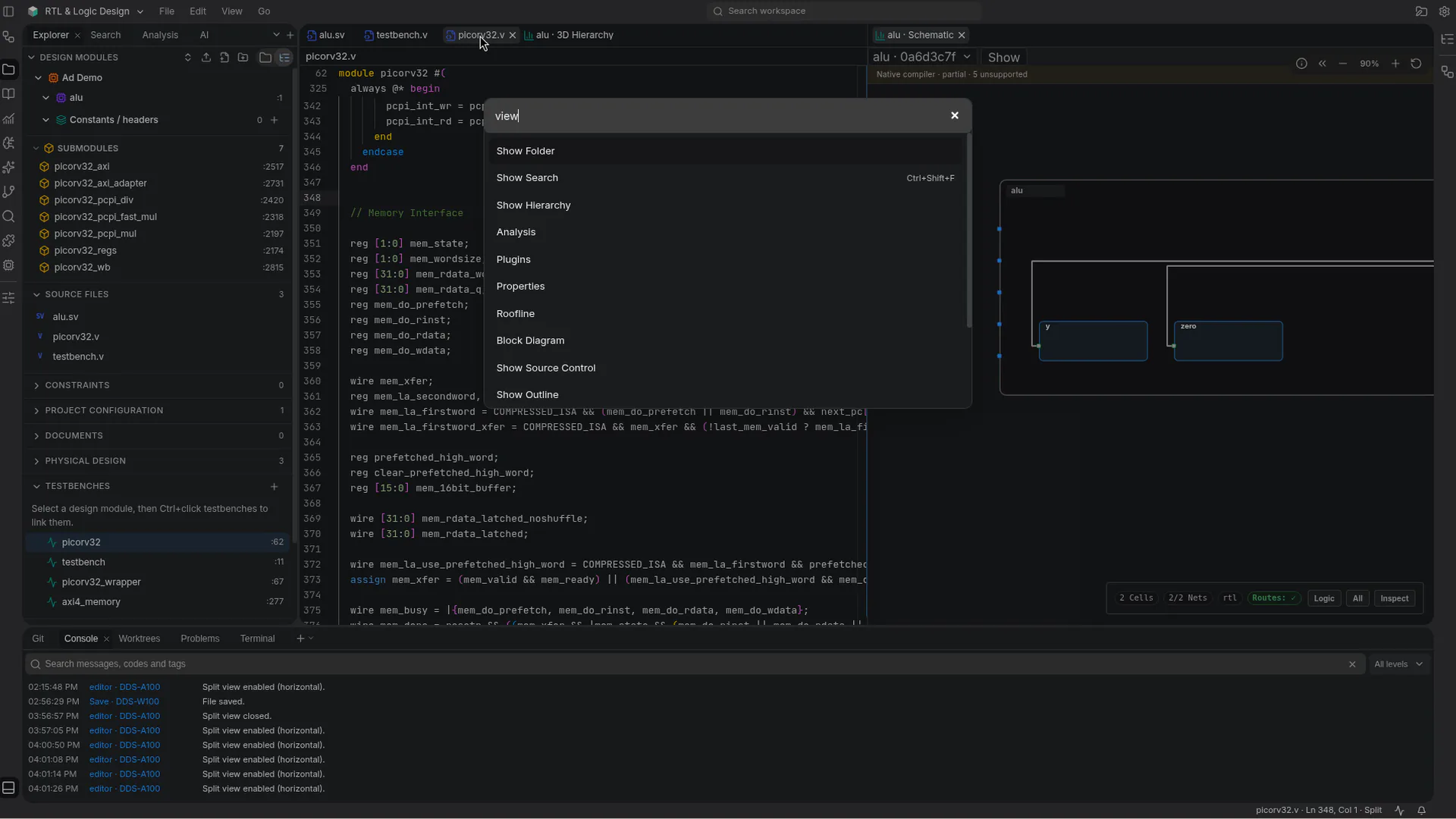
पदानुक्रम, रूपरेखा या वेवफ़ॉर्म दिखाने के लिए कमांड पैलेट में कमांड का नाम लिखें।
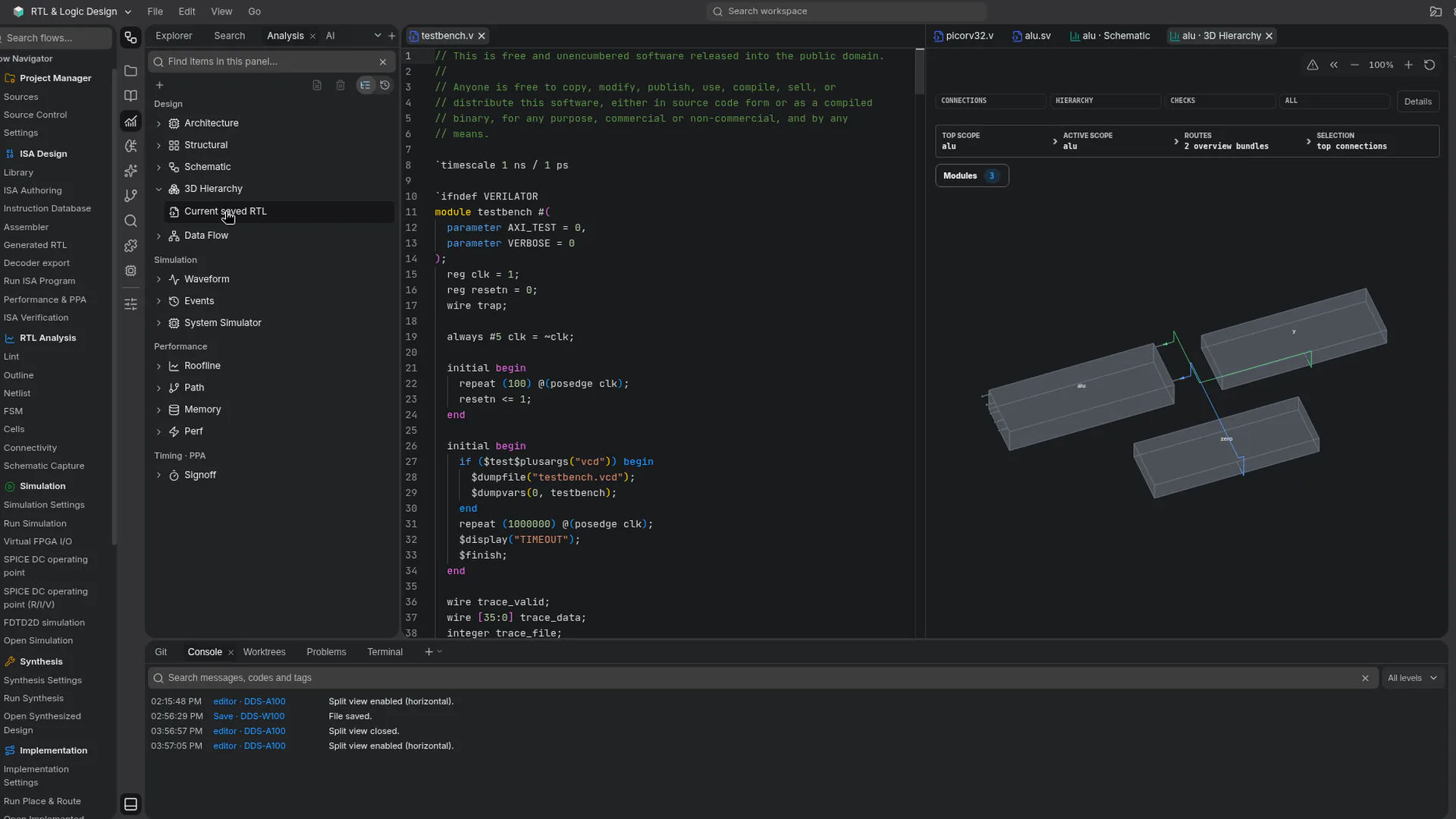
टेस्टबेंच को उसके मॉड्यूल के 3D पदानुक्रम के पास खोलें।
Roofline में कर्नेल की तुलना गणना क्षमता की अधिकतम सीमाओं और मेमोरी बैंडविड्थ से करें।
सहेजे गए रन की रिपोर्ट उसके वेवफ़ॉर्म, स्कीमैटिक और प्रदर्शन परिणामों के साथ पढ़ें।
उसी ऐप में ALcad में सर्किट और बोर्ड तैयार करें।
संदर्भ फ़ैब में किसी लॉट की यात्रा 3D में देखें।
भूमिका के अनुसार उपयोग
एक ही ऐप में RTL, Flow Navigator में ISA, ALcad और Agent इस साइट की तरह 14 भाषाओं में उपलब्ध हैं।
.sv, .svh, .v और .vh स्रोत संपादित करें, अपने PC पर RTL सिमुलेशन चलाएँ और हर रन का रिकॉर्ड किया गया वेवफ़ॉर्म देखें।
Windows या Linux पर स्थानीय फ़ाइलों के साथ काम करें, या साइन इन करके ब्राउज़र से अपना कार्यक्षेत्र खोलें।
Roofline दृश्य में गणना थ्रूपुट और मेमोरी बैंडविड्थ की तुलना करें और सहेजे गए टाइमिंग, PPA और साक्ष्य मान जैसे रिकॉर्ड हुए वैसे ही देखें।
जो टेस्टबेंच अपने आउटपुट में विफलता बताता है, वह Testbench reported a failure के रूप में दिखता है, और डेस्कटॉप ऐप में सिम्युलेटर की हर त्रुटि संपादक को संबंधित पंक्ति पर खोलती है।
Cloud में, Send to vFactory, GDS व्यूअर के लेआउट के साथ Design to wafer खोलता है। vFactory देखें
सुविधाएँ कहाँ चलती हैं
काम करने की जगह चुनें
डेस्कटॉप ऐप इस्तेमाल करें, Cloud कार्यक्षेत्र खोलें या CLI को अपने स्वचालन में जोड़ें।
Windows या Linux पर Digital Design Studio में स्थानीय फ़ाइलों पर काम करें। Windows पर 2.1.2 से बाद के संस्करणों में अपडेट करते समय अब Windows को फिर से शुरू करने के लिए नहीं कहा जाता।
अपना डाउनलोड चुनेंAltifigence में साइन इन करें और ब्राउज़र से अपना कार्यक्षेत्र खोलें। जब आप किसी Cloud विंडो पर लौटते हैं, तो उसके संपादक और तैयार हो रहा RTL स्कीमैटिक दोबारा लोड होने के बजाय जैसे थे वैसे ही रहते हैं। प्रोडक्शन बिल्ड में, साइन इन से पहले Cloud प्रारंभ पेज के लिए डाउनलोड होने वाला कोड 1.18 MB से घटकर 0.72 MB (gzip) हो गया, और प्रोजेक्ट सूची के लिए 1.25 MB से घटकर 0.79 MB हो गया।
Cloud में मुफ़्त में शुरू करेंस्क्रिप्ट और CI कार्यप्रवाहों के साथ Altifigence CLI इस्तेमाल करें।
CLI मार्गदर्शिका पढ़ेंLinux CLI में alti-mcp शामिल है, जो आपके कंप्यूटर पर चलने वाली एक स्थानीय MCP प्रक्रिया है। Cloud MCP, Account साइन-इन और संगठन की सहमति का उपयोग करता है।
MCP गाइड पढ़ेंWindows ऐप में, Git आपके PC के फ़ोल्डर में मौजूद प्रोजेक्ट पर काम करता है। Source Control में सहेजे गए अंतर देखें, बदलाव स्टेज करें और उन्हें कमिट करें।
स्रोत नियंत्रण गाइड पढ़ेंअपने अगले डिज़ाइन से शुरुआत करें